Common table expressions (CTE’s), What, Why & How
Until you’ve used them a few times Common Table Expressions (CTEs) can be a little confusing but there not just about joining tables together. CTEs allow you to build up a resultset which you can then act upon again to do something else.
In the case below we get the number of orders per SalesPersonID
SELECT
    SalesPersonID
   ,COUNT ( * ) NumberOfOrders
FROM	Sales.SalesOrderHeader
WHERE	SalesPersonID IS NOT NULL
GROUP BY SalesPersonID
If you now wanted the average number of orders per SalesPersonID you can do the following, Just using a subquery around the first query to group the data works fine.
SELECT
	AVG ( NumberOfOrders ) [Average Sales Per Person]
FROM
(
	SELECT
	    SalesPersonID
	   ,COUNT ( * ) asNumberOfOrders
	FROM	Sales.SalesOrderHeader
	WHERE	SalesPersonID IS NOT NULL
	GROUP BY SalesPersonID
) AS data
This can also be rewritten as a CTE
WITH Sales_CTE (SalesPersonID, NumberOfOrders)
--Given the name Sales_CTE and specified the columns that will come out of the first query

AS (SELECT
	    SalesPersonID
	   ,COUNT ( * )
	FROM	Sales.SalesOrderHeader
	WHERE	SalesPersonID IS NOT NULL
	GROUP BY SalesPersonID)
SELECT
	AVG ( NumberOfOrders ) [Average Sales Per Person]
FROM	Sales_CTE
--Sales_CTE becomes a queryable table from the CTE above
All pretty simple you ask, so why do you need CTE’s, well the answer is recursion
Example
Say you wanted to generate a table to join to with a list of numbers from 1 to X,
You could create a temple table them insert some data in a while loop, nah thats boring and a waste of resources
This will create a CTE which is a table you can join against
;WITH CTE
AS (SELECT
	1 i
	UNION ALL
	SELECT
		CTE.i + 1
	FROM	CTE
	WHERE	CTE.i < 10)
SELECT
	i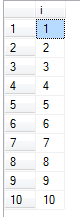
And it has a nice simple execution plan
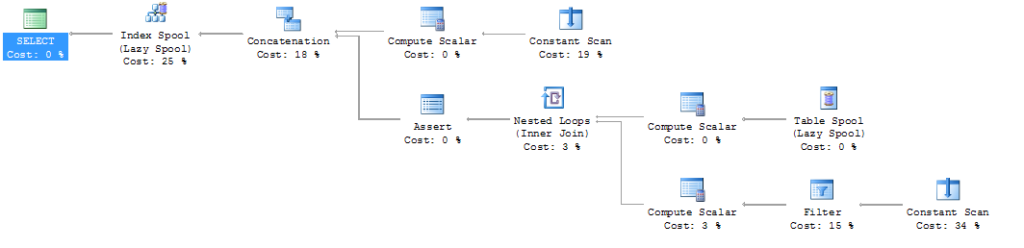
So even better if you alter the query to go to 100 there is no noticeable difference in speed, wow I hear you say, but there is a downside, try setting the where clause to 1,000,000

Oops, an error. You can recurse down a tree more than 100 times.
Unless you use the option(maxrecursion 32767) but even then you can only set a max recursion level of 32767
So you can also embed a CTE to work upon the results of a previous CTE perhaps you simply want to list the year and month since 2013 and stop at the current month, which at the time of writing is, the result below can be produced with the double CTE below

;

WITH CTE1
AS (SELECT
	2013 year
	UNION ALL
	SELECT
		CTE1.year + 1
	FROM	CTE1
	WHERE	CTE1.year < YEAR ( GETDATE ()))
	,CTE2
AS (SELECT
	CTE1.year
	   ,1 month
	FROM	CTE1
	UNION ALL
	SELECT
		CTE2.year
	   ,CTE2.month + 1
	FROM	CTE2
	WHERE	CTE2.month < 12
		AND
		(
			CTE2.year = YEAR ( GETDATE ())
			AND CTE2.month < MONTH ( GETDATE ())
		))
SELECT
	DATEFROMPARTS ( CTE2.year, CTE2.month, 1 )
FROM	CTE2
ORDER BY CTE2.year DESC
		,CTE2.month DESC
So a more complicated real-life solution, below is a sample of org chart-type data
CREATE TABLE organisation
(
    id			INT
   ,JobPosition VARCHAR(50)
   ,managerID	INT
)

INSERT	dbo.organisation
(
    id
   ,JobPosition
   ,managerID
)
VALUES
(1, 'Big boss', 0)
,(2, 'Director of Sales', 1)
,(3, 'Director of Manufacturing', 1)
,(4, 'Director of Development', 1)
,(5, 'Director of Research', 1)
,(6, 'Sales Manager 1', 2)
,(7, 'Sales Manager 2', 2)
,(8, 'Sales agent one', 6)
,(9, 'Sales agent two', 6)
,(10, 'Sales agent three', 7)
,(11, 'Sales agent four', 7)
,(12, 'Research bod 1', 5)
,(13, 'Research bod 2', 5)
And the below results can be returned from the organisation table

The query
--The cte

;
WITH OrgTree (id, JobPosition, managerid, level, TreePath)
AS (
--part1
        SELECT
    	    id
	   ,JobPosition
	   ,managerID
	   ,0	Level
	   ,CAST(JobPosition AS VARCHAR(MAX)) TreePath
	FROM	organisation
	WHERE	managerID = 0

	UNION ALL

--part 2
	SELECT
            o2.id
	   ,o2.JobPosition
	   ,o2.managerID
	   ,level + 1
	   ,o.TreePath + ' -> ' + o2.JobPosition Treepath
	FROM	dbo.organisation AS o2
	JOIN OrgTree			 o
	ON o.id = o2.managerID)
SELECT
	*
FROM	OrgTree
ORDER BY TreePath
Thus the first part of the cte above the UNION ALL (part 1) gets the big boss where the manager id = 0
Then the query below the UNION ALL (part 2) will get all posts that report to the manager from the first part, this then repeats moving down a level at a time
Also the little addition of the treepath helps the grouping of staff under their manager so that’s why its ordered by that.
Useful link